
Microsoft
Re-imagine customer Windows computer purchase customer journey
ROLE
Co-lead User Researcher and Designer
TIMELINE
2 months
TEAM COLLABORATION
Creative Director, Microsoft Retail Experience team, Retail leadership, store managers, and sales people
TOOL USED
Adobe XD, Illustrator, PowerPoint
DELIVERABLES
Personas, experience map, User journey, storyboards of future state, mid-fidelity prototype of a new online shopping experience, report out to leadership
About project
As Microsoft prepared to phase out support for older Windows operating systems, the Microsoft Retail Experience team spearheaded a campaign to raise awareness among consumers shopping for new PCs and laptops. The initiative aimed to educate shoppers about the advantages of upgrading to newer systems equipped with the latest Windows software.
Customer needs
Educate shoppers about the advantages of upgrading to newer systems equipped with the latest Windows software.
Retail store needs
-
Get better at reporting numbers
-
Shift communication to scale
-
Manage in store PC sales better
-
Microsoft branding in store work
01 BACKGROUND
PHASE 1
Improve the Best Buy customer experience
Re-envision the customer journey with a focus on diverse personas to improve overall engagement.
02 STRATEGY
Best Buy customer experience
Microsoft’s Retail Experience team faced the challenge of designing personalized in-store experiences to engage and influence a diverse range of customers shopping for computers. This phase of the project concentrated on enhancing the customer journey at the Bellevue, Washington Best Buy, laying the groundwork for implementing improvements across Best Buy locations nationwide.
Design strategy to understand the customers
1. Facilitate envisioning workshop
What is the customer's current
shopping journey?
2. Contextual research at Best Buy
Why do customers hesitate to
upgrade their computer systems?
3. Design user-centered solutions
How do we re-imagine customer shopping experience?
03 RESEARCH
Understanding the customer
My creative director and I began our research by leading an envisioning workshop with the Microsoft Retail team to explore customer personas and business needs, aiming to enhance the shopping experience and drive sales of computers and Microsoft software at Best Buy.
Envisioning workshop with the Microsoft retail team


Julie, Small business owner
We roughed out three personas and their customer journeys over a two day envisioning workshop.
This example illustrates Julie's journey, a tech-savvy small business owner seeking to upgrade to a sleek, modern computer to better support her needs.
Contextual research at Best Buy to observe the shopping experience
To better understand our workshop personas, we visited Best Buy to observe computer shoppers and engage with Microsoft Retail staff, aiming to empower sales associates, boost performance, and identify sales opportunities.


04 EMPATHIZE
Define the primary customers and their needs
Through our workshops and observations, we identified and developed three primary customer personas uncovering valuable insights to help the retail team address customer needs and design tailored, engaging experiences.
Primary customer personas

Karl
Reticent
Basic computer skills
About
Dentist
68 years old
Married
Behavior
Doesn't like change
Conservative
"My computer is so slow, I need to get an updated computer but don’t want to!”
With over 23 years of dentistry experience in Carnation, Washington, Karl maintains an active outdoor lifestyle with his wife and grown children, Amy and Jason.
Goals
Own a reliable, easy-to-use computer that simplifies managing business documents and emails.
Ensure computer is compatible with his existing printer and other devices.
Minimal technical issues to reduce reliance on his kids or external support for troubleshooting.
Pain points
His outdated computer is slow and struggles to handle even basic tasks efficiently.
Has trouble connecting devices to his outdated computer anymore.
Troubleshooting and getting support is increasingly difficult as his outdated system is no longer fully supported.
Need
Karl needs expert guidance to build trust to find a reliable, user-friendly computer compatible with his printer.
Feelings
He worries about potential compatibility issues if he upgrades his computer, especially with his printer if he decides to get a new computer.
He is resistant to upgrade his computer, prefers Windows 7.
Meet Karl


User stories from persona development
Through persona development, we created user stories highlighting Best Buy customers' needs and goals, guiding design decisions for a better shopping experience.

As a reticent to computers...
Find reliable computer
...I want guidance in selecting a computer that meets my basic needs, so I don’t feel overwhelmed or make the wrong choice.
Address compatibility concerns
... I want to know my printer and files will work seamlessly with a new computer, so I can upgrade without worrying about disruptions.
Ensure a smooth transition
...I want hands-on support and a return policy, so I feel confident upgrading from Windows 7 without regret.”

As a tech-savvy person...
Explore laptop options
...I want a sleek, modern laptop that matches my personal style and professional needs, so that I can feel confident and efficient in my work and client meetings.
Friends and social media validation
...I want to share my laptop options as I shop with friends and followers to get feedback and validation, so that I can make a decision I feel good about.
Simplify the setup process
...I want my new laptop to be easy to set up and integrate with my current tools, so that I can quickly get back to running my business and blogging.

As a gamer tech setter...
Customize my laptop
..I want to build a customized laptop with cutting-edge specs, so I can optimize it for gaming, work, and content creation.
Stay on the cutting edge
...I want the latest and fastest technology, so I can maintain my tech-savvy image and keep up with innovations.
Validate My Decision
...I want personalized demos and reviews, so I can be sure the laptop meets my high performance and style expectations.
05 IDEATE
Mapping the customer experience
Using workshop insights, we created journey maps for users like Julie, Karl, and Sam, showcasing their unique paths to finding the right laptop. This helped define a more delightful experience for all customers.
Customer journey map

06 DESIGN
Visualizing a new customer digital shopping experience
My Creative Director and I designed a mid-fidelity digital tool for the Microsoft Retail team, creating personalized workflows to enhance customer engagement and support the retail team.
Brainstorming on surface whiteboard

Mid-fidelity prototype of new digital shopping experience

PHASE 2
Redesign Best Buy store performance reports
Empower productivity through user-focused Power BI reports.
01 BACKGROUND
Current state
Microsoft WYSET Power Bi reports provide access to various performance metrics related to Microsoft retail sales operations. These reports were built over time in different phases and were never created with any overarching UI/UX strategy of any kind.
Top pain points
-
No predictive data to help meet targets.
-
Reports show numbers but don’t tell the “whys.”
-
Have to pull from different tabs to analyze data.
Top business needs
-
Cross-product and sales dashboards.
-
Dynamic reports with At least 1 year of data.
-
Call out important information.
-
Highlight data trends.
-
Ability to do a quick compare.


02 EMPATHIZE
Understanding the diverse needs of the Best Buy team
Our research focused on how we could revamp the Power BI reports to provide the performance metrics Best Buy team needs for a successful Microsoft's retail sales operation.
Contextual research
Our contextual observations at Best Buy and staff interviews helped us identify unmet needs of managers aiming to enhance store performance and the sales performance of specialists striving to meet bonus criteria. This insight guided the development of more effective reporting tools to address these challenges.

Regional managers
"I need to help my performers get better numbers so that they can get their bonus."
Objectives
-
Daily / monthly PMR analysis.
-
Learn about issues in store.
-
Look at data backwards.
-
Analyze regional / store trends.
-
Track and analyze store ranking.

District Managers
"I need to compare my market to other markets so that I can make sure I am hitting my target sales."
Objectives
-
Prioritize store visits.
-
Analyze store MTD scorecard.
-
Evaluate Overall store setup.
-
Qualify and train experts.
-
Collaborate with leadership.

Specialists
"I need to track my target sales so that I can make sure I meet my goals to get my bonus."
Objectives
-
Compare last year's PMR.
-
Use report to track bonus.
-
Increase sales of MSFT brand.
-
Meet target revenue.
-
Store setup in the morning.
03 RESEARCH
Understanding the current state of the performance reports
I conducted heuristic analysis of the current reports used by the Best Buy team to gather store performance insights, focusing on revamping Power BI reports to deliver the essential metrics needed for a successful Microsoft retail sales operation.
Findings
-
Drilling in and through report data is very complex and tedious.
-
Hard to quickly find call to actions.
-
No visual indicators to call out important information.
-
Missing tool tips with detailed data insights and visualizations for greater transparency (e.g., units sold by specialists vs. experts).
Proposed new features to enhance data visualization

04 DEFINE
Design thinking process
We collaborated with Best Buy managers and specialists throughout the design thinking process to address the right challenges, setting a clear direction for ideation and prototyping a new store performance reporting application. This approach ensured alignment and inspired innovative, user-centered solutions.
Our process
Envisioning workshop
Explored how managers used key reports to track store performance, identifying ways to improve goals, strategies, and sales.

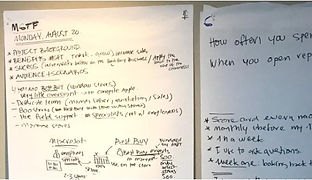
Whiteboarding sessions
Brainstorm ideas to address the retail team's needs, technical constraints, and business goals.

Brainstorming solutions
I captured detailed notes to fuel data visualization ideas and shape workflows during my design process.
05 IDEATE
Mapping the retail team's experience
To enhance usability and drive better insights, a redesign of the performance reports experience has been proposed, focusing on creating a more intuitive and impactful interface for users.
New site structure
Laying the groundwork for a functional, intuitive, and scalable website we brainstormed a new site structure to ensure the new design and content align with user and business goals.

Wireframe development
We incorporated the outcome of the workshop findings into low-fidelity wireframes and mock-ups that evolved into final design recommendations that were presented to the client through a series of design meetings.

06 DESIGN
Redesigning legacy reports
Incorporated insights from our design thinking processes into developing a new performance reporting application for all Best Buy stores, creating a more user-friendly and efficient tool for retail operations.
New features added to Power BI application
-
Visualization of trends over user-selected time frames for comprehensive data analysis.
-
Used color in reports, highlighting different products and critical information for better discoverability.
-
Intuitive date range options, past 30 days, 6 months, year, or quarterly periods.
-
Ability to save filters for custom data views, easily shareable via URL.
-
Responsive design ensuring compatibility across devices, including smartphones and tablets.
Final Design

Dashboard
Gives an overall performance view of products and team sales.
-
Clear snapshot: Overall weighted PMR % gives managers and specialists a quick view of performance for effective communication.
-
Drilldowns: Product MTD scorecards with YoY growth and drill-down options for detailed insights.
-
Issue transparency: Highlights underperforming stores to address training, inventory, or staffing challenges promptly.
-
Celebrate success: Top performers by MTD showcase excellence, boosting morale and rewarding achievements.
-
Actionable insights: Color, tooltips, and visualizations emphasize key information for quick decision-making.


